Unicode guide
How to Remove Invisible Characters from Text
The safest way to remove invisible characters is to inspect the original first, identify the exact code points, clean a separate copy, and verify that the target characters are gone. That workflow avoids changing visible words by accident.
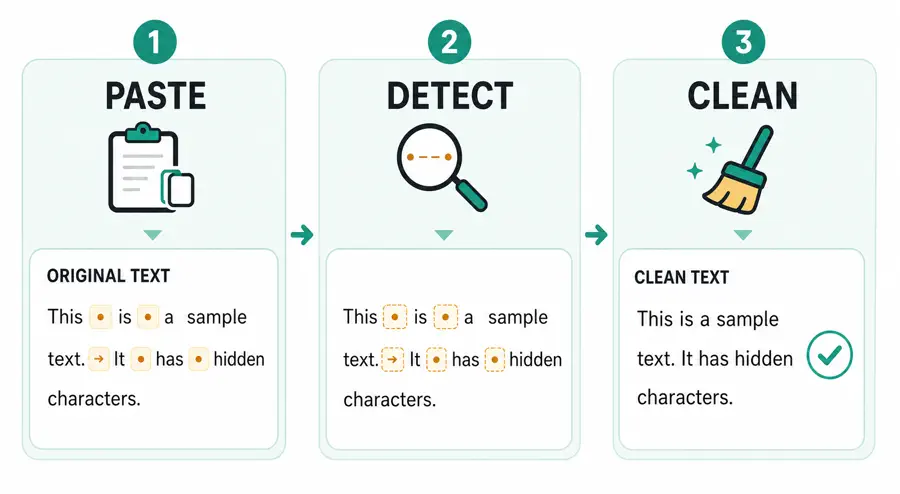
Paste the Text You Want to Check
Begin with the exact text that is causing the problem. Keep the original in a separate document, then paste a copy into a Unicode-aware checker. This is safer than immediately running a global replacement in a word processor because the visible text may look normal even when the stored characters are not.
The Hidden Character Detector accepts up to 100 Unicode characters in its one free check. It runs in the browser, highlights suspicious characters in their original positions, and shows the code point and Unicode name for each match. The input is not overwritten when you click Detect.
Review Code Points and Character Counts
Look at the exact result before cleaning. A label such as ZERO WIDTH SPACE U+200B gives you more information than a generic “bad character” warning. The count also matters. One accidental mark may come from a single paste operation; dozens of identical marks may suggest a formatting pipeline or a repeated transformation.
Common values include:
| Code point | Name | Typical cleanup |
|---|---|---|
| U+200B | ZERO WIDTH SPACE | Remove when not intentional |
| U+200C | ZERO WIDTH NON-JOINER | Remove only when not needed for the script |
| U+200D | ZERO WIDTH JOINER | Preserve when it forms an intended emoji or writing sequence |
| U+00A0 | NO-BREAK SPACE | Normalize to a regular space |
| U+FEFF | ZERO WIDTH NO-BREAK SPACE (BOM) | Remove from ordinary text; preserve a file BOM when required |
The same code point can be legitimate in one context and unwanted in another. A developer working with international text should check the language and rendering requirements before deleting every formatting control.
Remove Zero-width and Formatting Characters
For ordinary copied English text, zero-width spaces, stray BOM characters, soft hyphens, word joiners, and directional overrides are often safe to remove when they are not part of a deliberate format. The tool’s Remove All action creates a new result rather than mutating your input. It reports how many characters were removed and how many spacing characters were normalized.
The distinction is intentional. Deleting U+00A0 from hidden[U+00A0]text would produce hiddentext, which changes the visible meaning. Replacing it with U+0020 produces hidden text and removes the unusual code point without joining the words.
Normalize Unicode Spaces Safely
Unicode includes many spaces for typography: EN SPACE, EM SPACE, THIN SPACE, HAIR SPACE, and others. They are not automatically errors. If your goal is consistent plain text for search, form validation, or a database field, normalizing them to U+0020 is usually more predictable than deleting them.
Do not normalize blindly when the spacing is part of a typeset document or a language-specific layout. For a simple text-cleaning workflow, save the original, create the normalized copy, and compare the visible words and line structure afterward.
Verify the Clean Result
Cleaning is not complete until you check the result. Run the cleaned text through the detector again. A successful result should contain no target code points from the detector’s definition list. Also compare the before and after character counts, check paragraph breaks, and copy a short sample into the destination system where the original problem appeared.
If the result will be used in code, inspect the escaped representation as well. A visible example such as A[U+200B]B is easier to audit than a source file that appears to contain AB. If the result will be used in a document, confirm that links, emoji sequences, and right-to-left text still render as expected.
Common Mistakes When Cleaning Text
One common mistake is using a regular expression that removes every character in a broad Unicode category. That may delete valid line breaks, language marks, or emoji joiners. Another is counting JavaScript string length without accounting for surrogate pairs. A third is replacing every whitespace character with nothing, which silently joins words.
A small, explicit definition list is easier to review and update. It also gives users a reason for every transformation. For sensitive or multilingual text, preserve the original and document the cleanup rule so another person can reproduce the result.
Try the Hidden Character Detector