Unicode guide
Why AI-Generated Text Contains Invisible Characters
AI-generated text can contain invisible characters for several ordinary reasons: a document editor, a copy-and-paste path, a formatting layer, or an experiment that uses Unicode markers. Finding one is useful evidence about the text pipeline, but it is not proof of authorship.
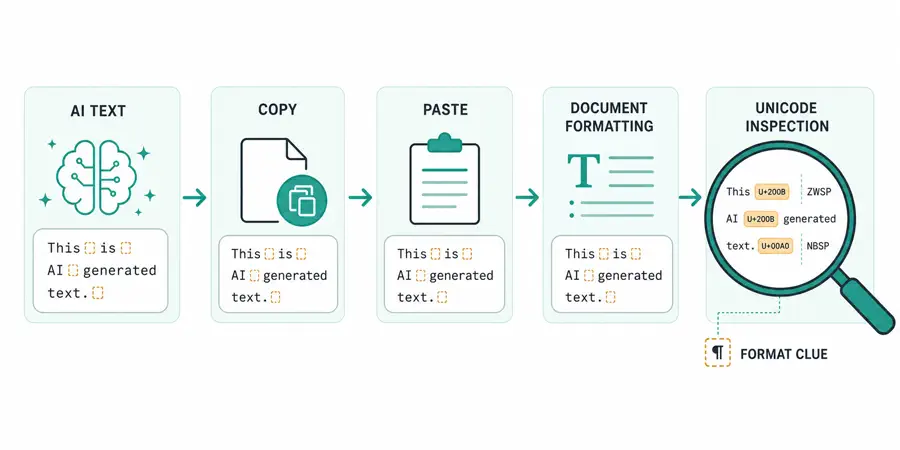
How Text Pipelines Can Add Invisible Characters
AI-generated text does not arrive in a vacuum. A user may copy it from a chat interface into a document editor, a browser may add formatting during a selection, or a publishing system may insert characters to control line wrapping and direction. Any of those steps can introduce Unicode marks that were not obvious in the original prompt or response.
The same is true for ordinary human-written text. Rich-text editors, PDFs, spreadsheets, messaging apps, and localization tools all have reasons to preserve spacing, joining, or writing direction. A zero-width space in a paragraph is therefore evidence that a text-processing path changed the string, not a complete explanation of who authored it.
AI Watermarks vs. Ordinary Unicode Formatting
The phrase “AI watermark” can refer to several different ideas. Some proposals place a statistical signal across many visible token choices. Other experiments discuss invisible characters or formatting marks. These approaches are not interchangeable, and a basic Unicode scan cannot validate a statistical watermark system.
What a scanner can do is more concrete. It can tell you that U+200B ZERO WIDTH SPACE, U+FEFF BOM, U+202E RIGHT-TO-LEFT OVERRIDE, or another selected code point is present at a particular position. It can count how often the mark appears and produce a cleaned copy. It cannot tell you whether a model, a browser extension, a document editor, or a person placed it there.
A detected invisible character is not proof that text was generated by AI. Treat it as a Unicode and formatting clue, then check the source and editing history before making an authorship claim.
What Invisible Characters Can and Cannot Prove
The strongest conclusion is usually narrow: “This string contains these code points.” That conclusion is reproducible. Anyone with the same input and the same detection list can confirm it.
Stronger claims require stronger evidence. To argue that an invisible mark is an intentional watermark, you would need a documented method, a known insertion rule, a comparison set, and a way to distinguish the mark from normal copy-and-paste artifacts. Even then, an absence of a mark would not prove that a paragraph was written by a person.
This distinction matters for schools, publishers, hiring teams, and moderation systems. A Unicode check can support a technical investigation, but it should not be the only basis for a consequential decision about a writer.
How to Inspect AI-Generated Text
First, preserve the original text and its source. Do not paste over the only copy. Next, run a Unicode-aware detector and review the highlighted positions. Pay attention to the exact code point, not just a label such as “invisible.” U+00A0 is a spacing character, while U+200B has zero width and a different effect.
The Hidden Character Detector performs this inspection locally in the browser. It reports the Unicode name, code point, and count for each match. It also counts Unicode code points rather than JavaScript storage units, which avoids treating an emoji as two characters in the summary.
How to Clean Suspicious Formatting Without Changing Visible Words
Use a separate clean result. Remove zero-width and formatting controls when they are not required by the language or document. Normalize non-breaking and Unicode spacing characters to ordinary spaces so words do not become joined. Normalize line and paragraph separators to regular line breaks when preserving the line structure is important.
After cleaning, search the result again for the same code points. If the text is going into a database, compare both the original and clean lengths, and log the transformation policy rather than only storing a vague “sanitized” label. If the text is multilingual or includes right-to-left scripts, ask a localization specialist before deleting bidirectional controls.
A Practical Conclusion
An AI hidden character detector is most useful when it is honest about its boundary. It can detect invisible Unicode characters and remove them from a copy. It cannot identify authorship, reconstruct a hidden watermark algorithm, or prove intent. Use the output as a transparent text-quality signal, not as an automatic verdict.
Try the Hidden Character Detector